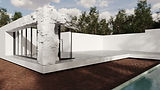
Imagine learning all of these effects.

The Easiest way to learn Tyflow
✔️ 3DsMax animation, from the Timeline, Keyframes, and Animation Curves.
✔️ Tyflow from scratch to advanced simulations, like the ones in the short film Syntropy.
✔️ Animations: Sliding, Pop, Destruction, Reconstruction, Slow motion, Reverse, Skeleton, and Vegetation.
✔️ Rendering animations with Chaos Corona.
✔️ Exclusive techniques created by Thi Lima (not available on YouTube).
✔️ Linearly structured course.
✔️ Learn to work in an organized way and prepare yourself for large-scale projects.
✔️ 2 years of access to classes.
✔️ 2 years of support for questions.
✔️ Free updates.
✔️ Subtitles in Portuguese, English, and Spanish.
✔️ Artist community featuring the largest companies in the country.
✔️ #NoCoachTalk (No BS marketing)
What will you learn?
activate the video subs.
Prerequisites
• 3Ds Max 2024 +
• Free Tyflow (Pro optional)
• Chaos Corona (optional)
• After Effects 2024 + (optional)
• Intel i7 ou AMD Ryzen 7 or +
• 12gb ram or +
• GPU: Gtx 1080 or +
#01
Animation
Basics
You will learn 3DsMax animation from the timeline, keyframes, and animation curves, making it the perfect module even for those who have never animated anything in their lives.

+20 mins
4 lessons
#02
Tyflow
Basics
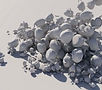
You will learn how to use Tyflow, from installation and interface, evolving into more complex flows. This module will already teach you how to export and render your animations.
+2:24 hours
18 lessons
#03
Gravity and
Slow-motion
From this module on, you will learn how to create the animations from the short film Syntropy, starting with gravity and slow-motion animations.

+32 mins
3 lessons
#04
Destruction and Reconstruction
In this module, you will learn everything about destruction and reconstruction, from introductory theoretical classes to the practical application of effects on walls, the dining table, and the kitchen island.

+1:03 hours
9 lessons
#05
"Sliding"
In this lesson, you will learn sliding animations, which in the short film are applied to the kitchen stools and dining table chairs.

+8 mins
1 lesson
#06
Rotation
In the lessons of this module, you will learn rotation animations, such as the ones on the wooden slats in the dining area, the flooring and deck in the pool area, and also the windows of the house.

+38 mins
5 lessons
#07
"Pop"
In this module, you will learn how to create Pop animations, where furniture and decor appear quickly and dynamically, dropping perfectly into their desired positions.

+13 mins
1 lesson
#08
Wood
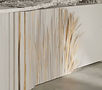
In this module, you will see the differences in creating simulations that represent "reconstructing" wood, creating an effect very similar to a wave or the sequential movement of piano keys.
+7 mins
1 lesson
#09
Vegetation
In these lessons, you will learn 3 different ways to distribute the lawn across the surface, vegetation animation with wind, and finally, the animation of the grass expanding and growing with a stunning effect.

+41 mins
3 lessons
#10
Cloth
In this module, you will learn how to create animations for various types of fabrics, from the introduction simulating detailed bedsheets, followed by curtains unrolling animations, and finally, pillows that combine the pop effect with fabric simulations.

+39 mins
3 lessons
#11
"Inflate"
In these lessons, you will learn how to work with the inflate tool to create this effect of the sofa inflating like a balloon, which is sure to impress your clients.

+3 mins
1 lesson
#12
Skeleton
In these lessons, you will learn how to work with Skeleton nodes, which allow you to combine deformation and reconstruction animations, as seen on the living room lamps, the dining room pendants, and this tree at the end of the short film Syntropy.

+40 mins
5 lessons
Discover the full course content.
001 - Customization
002 - FPS and Timeline
003 - Keyframes
004 - Animation Curves
005 - Installing Tyflow
006 - Tyflow: Interface
007 - Understanding basic flows
008 - Basic Physx flows
009 - Multiple Events - Physx Collision and Voronoi
010 - Typreview and Corona Render
011 - Challenge 1
012 - Voronoi Simulation - Challenge 1
013 - Time test
014 - Surface Test
015 - Object Test
016 - Property Test
017 - Force Node
018 - Custom Properties
019 - Timing and Interpolation
020 - TimeStep
021 - Export Particles: Objects
022 - Export Particles: Tycache001 - Fruit Organization
002 - Fruit Simulation
003 - Fruit Slow Motion
004 - PhysxSwitch
005 - PhysxBind
006 - Spawn
007 - By Travel Distance
008 - Matcap
009 - Challenge 2
010 - Dining Table
011 - Dining Table Reverse
012 - Kitchen Island Countertop Review
013 - Sliding Chair
014 - Walls
015 - Drawers
016 - Wodden Slats
017 - Windows
018 - Pool Tiles
019 - Living Room Decor
020 - Kitchen Island Wood
021 - Grass
022 - Animating Grass
023 - Grass Reveal
024 - Cloth
025 - Curtains
026 - Pillows
027 - Sofa
028 - Pendant
029 - Floor Lamp
030 - Trees Detach
031 - Tree Animation
032 - Organization

Thi Lima
*Teacher
Graphic Designer and Generalist 3D Artist with 20+ years of experience, especially in photorealistic 3D rendering.
He has worked as a Graphic Designer, Web Designer, Art Director, and 3D Finisher for advertising, product design, and animation. He is the only professor and the first Brazilian to win the 3D AWARDS , the most prestigious Archviz award in the world.
Their methodology aims to train truly self-sufficient professionals, combining theory and practice so that they can work in any area of 3D, especially in archviz.
47
Prizes
5
Events
9
Publications
+12K
Students
The biggest companies trust us.








Daniel Oliveira
unadesign.com.br
This course changed the way I see 3D. More than teaching techniques, it teaches us to see reality in a different way, making the process of reproducing it easier.

Thassio Freire
Freelancer
Impeccable teaching methods. The only course where I don't need to worry about having more than one teacher; I just need to keep myself updated every year through this platform.

Kiet Lam
3ti-asia.com
Thank you to Thi Lima for this incredible Corona Render course. Everything was explained in a super detailed and practical way. You are a very dedicated teacher. I'm glad I made the right decision in participating in this course.

Martin Kofoed
3d-visual.dk
This course is, to date, the most comprehensive immersion into Corona Render and all its features. I highly recommend it to anyone who wants to become a master of Corona and rendering in general.

Amanda Gonçalves
Freelancer
It far exceeded my expectations! The course is excellent, Thi's teaching style is amazing! The support is also an incredible way to continue studying and continuously improving your work. I recommend it 200%.

Fernando Bandeira
Freelancer
Not a course, a COLLEGE!
Courses teach what's in the curriculum, universities train thinkers, people capable of meeting market needs. Thank you for the opportunity to be part of this great content.

Rodrigo Losano
Freelancer
The course is AMAZING! It far exceeded my expectations, all the techniques and content covered are excellent, the teaching method is very good/practical, and the support that Thi Lima offers is fantastic! The best course focused on Archviz!

Carlos Eduardo
whitehousecgistudios.com
It far exceeded my expectations! The course is excellent, Thi's teaching style is amazing! The support is also an incredible way to continuously improve your work. I recommend it 200%.

José Arturo
Freelancer
He's by far the best. The way Thi Lima teaches is simply incredible; he has the ability to show many things that, whether you're a beginner or have years of experience in Archviz, you might ignore or never pay attention to.

Tobias Bueno
Freelancer
The course is really very good, it greatly improved the level of my work. Best of all, you understand the parameters, you understand how materials and lighting work in real life to reproduce them in 3D. I highly recommend it!